
FAQs

Payment Account

Since our company is a payment institution under the supervision of the National Bank of Slovakia, the security of your finances is our top priority. For legislative reasons, we must therefore verify whether the account you enter for payment belongs to you.

Submitting a withdrawal request from the account

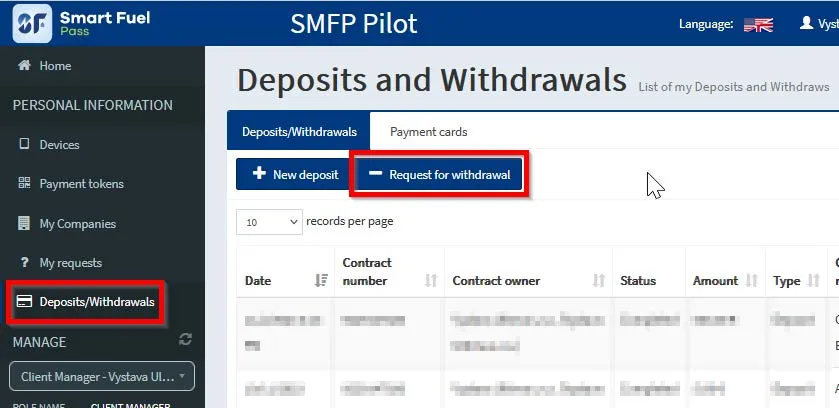
After logging in to the portal, you can request a withdrawal from your account in Ultima Payments in the menu Deposits / Withdrawals and then Request For Withdrawal.

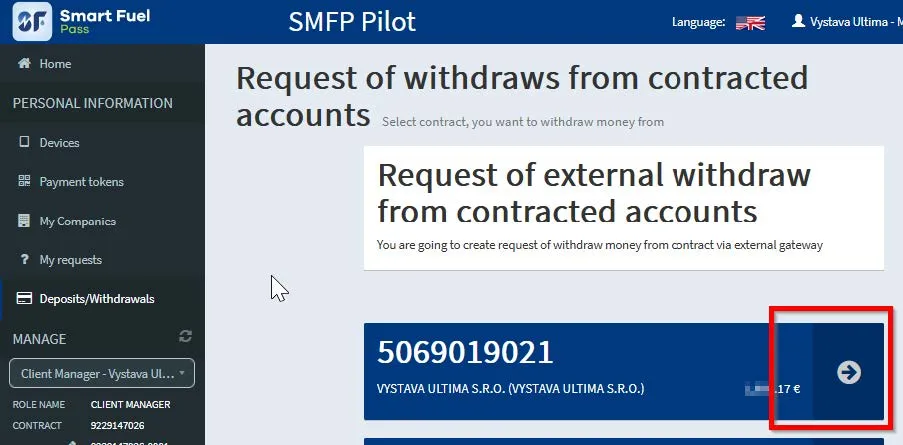
In the following screen, select from which account you want to make the payment:

Your payment will be made to the bank account that you have assigned to your company in your profile.

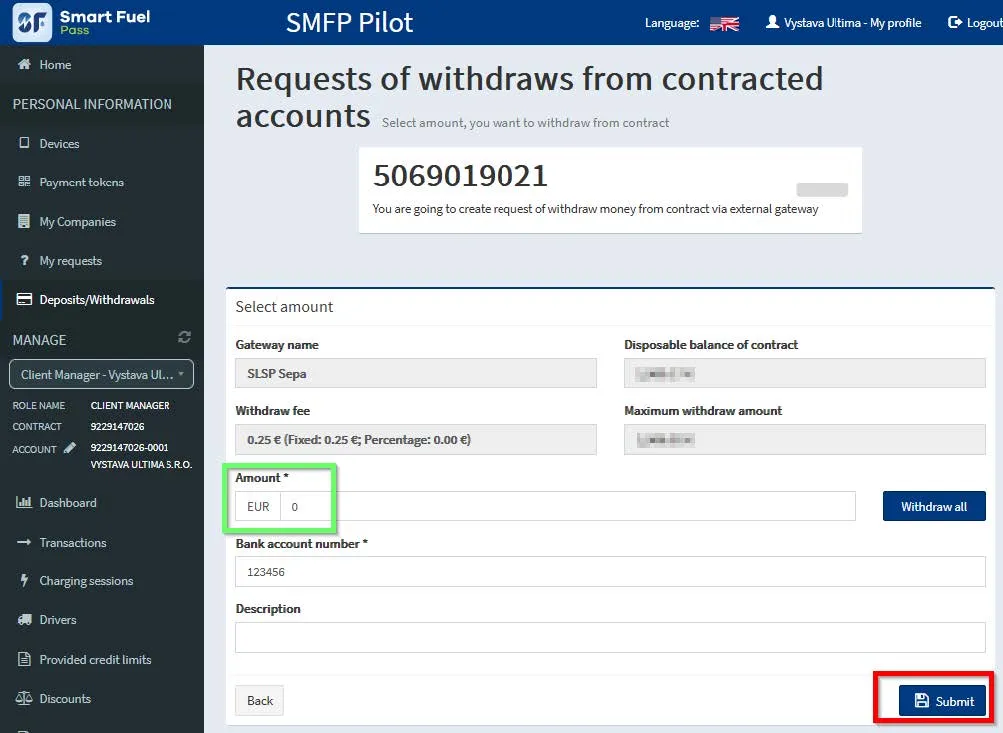
On the screen you can see the fee that will be charged to you for the transfer and the amount you have available for withdrawal.

Fill in the amount or withdraw all. You can enter your note in the description. After filling, press “Submit”.

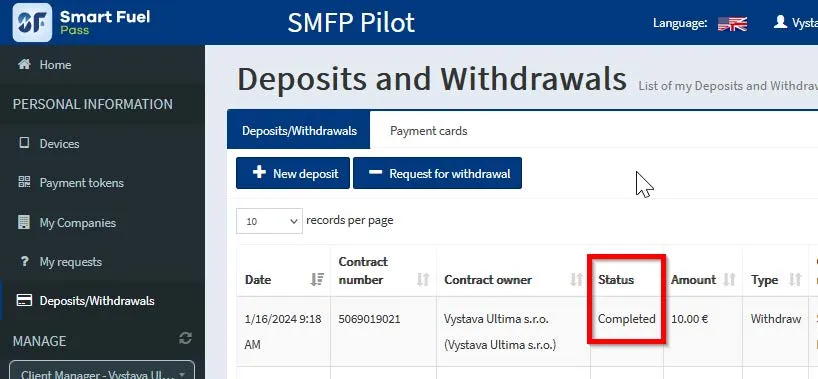
The request will be processed and the transfer made the next workday. You can see the processing status in the Deposits / Withdrawals menu in the “Status” column:

Maintaining an account in the Smart Fuel Pass app is free.

Registration

Uploading a document to the portal

After logging in to the portal, you have the option to send us the required documents via a secure, encrypted channel. Please log in to the portal first (the procedure for accessing the portal from the mobile application can be found at the end).

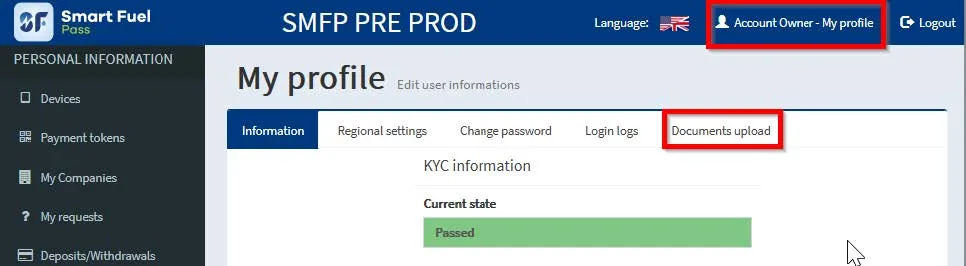
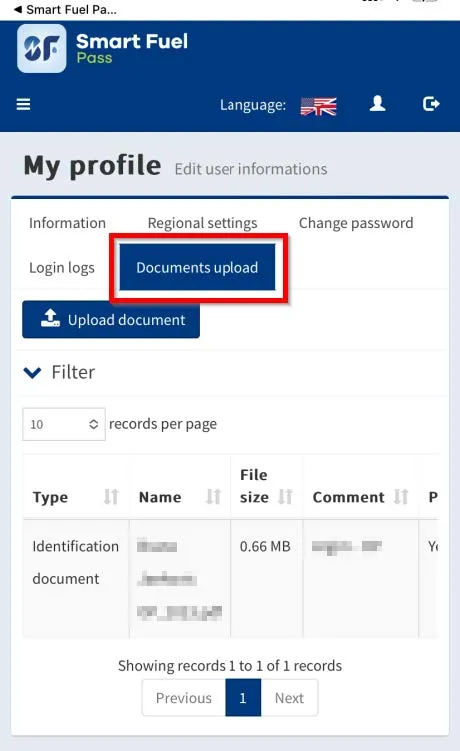
Afterwards click on “My profile” and then on ” Documents upload”:

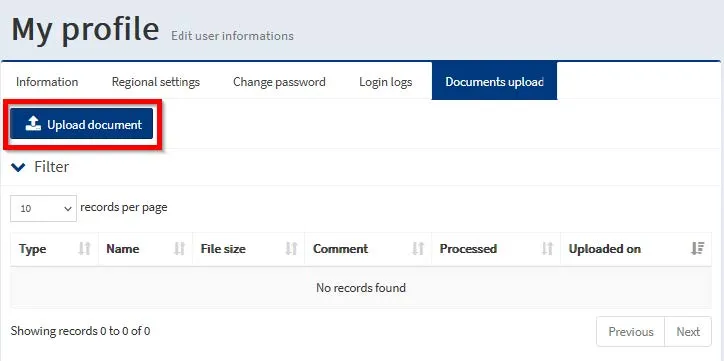
In the next step, click “Upload document”:

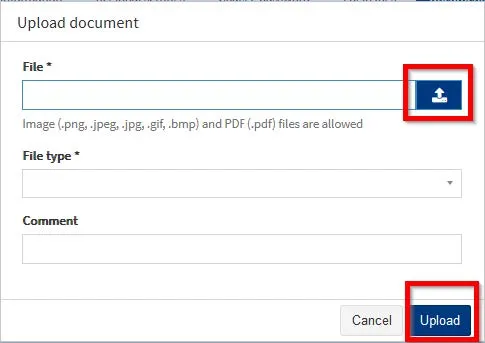
The following window will open:

Click the arrow icon to select the file you want to send us. Images (.png, .jpeg, .jpg, .gif, .bmp) and PDF documents (.pdf) are supported file formats.

File type, select the type of document you are sending us from the list. If there is no such type in the list, select the “Other document” option.

If you selected the Other document option, describe the inserted document to us in the Comment field.

The Comment field is also a place where you can enter other information about the uploaded document.

Then click “Upload”.

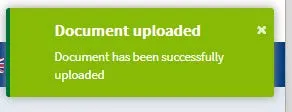
If the document is uploaded successfully, the following message will be displayed in the upper right corner:

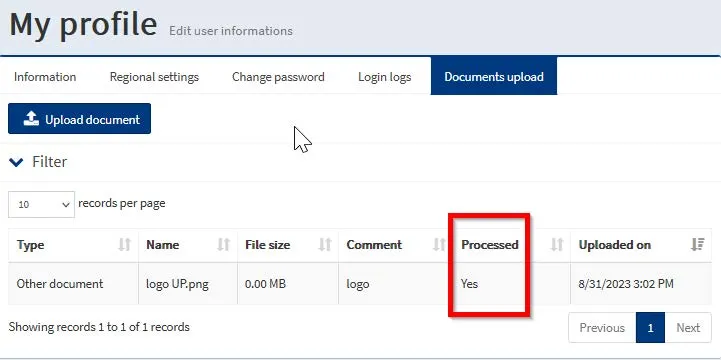
Our customer support team will process your document in the shortest time possible. Confirmation that we have processed the document can be found in the List of uploaded documents here:

In the case of the mobile application, the procedure is the same.

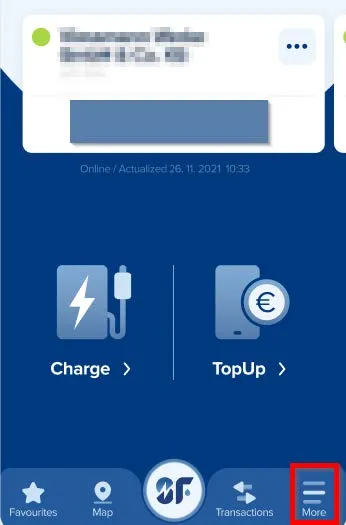
The portal will be accessed according to the following procedure. Log in to the application and select the “More” menu:

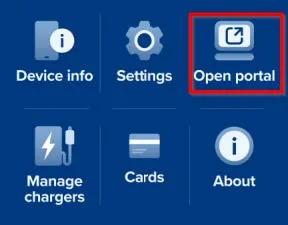
In the following screen, select the “Open Web Portal” option:

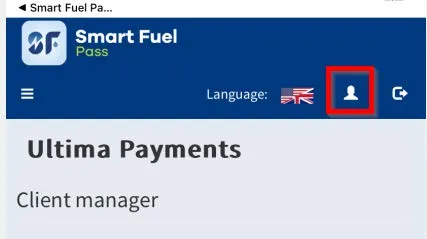
A web portal will open in your default web browser. Click on the Profile icon:

The next steps are identical to the above procedure.

In the event that they have to act together, i.e. there are e.g. two –one of them must be the applicant and the other must register as the second statutory representative in the Smart Fuel Pass.

It is necessary to have a VAT number.

A correctly completed registration is required, i.e. the data must be identical to the Commercial Register and the Financial Administration.

(The applicant can also be a non-statutory representative – in this case, he needs a power of attorney from the statutory representative(s) and a scan of the applicant’s ID card)

In addition, we need the ID of the statutory representatives (scan from both sides) and a scan of the bank account statement – it is necessary that the company name and account number are visible.

The applicant must provide a scan of the power of attorney in their name from the statutory officer or from the statutory representatives – depending on how they are authorized to act.

Likewise, the applicant must provide a scan of their ID card.

It is necessary that the supplied data are in accordance with the Commercial Register and the Financial Administration.

A directory is created in the system with the given company and when the supplied data is correct, the company is officially approved in the system.

If the data provided is incorrect, the approval process is extended.

When you register in our system, a payment account in Ultima Payments is automatically opened for you. Filling in details such as your date of birth or ID card when registering is part of our standard procedures. As a regulated entity of National Bank of Slovakia, we are obliged to collect this information in order to comply with legal regulations and legislative requirements. 

Due to the fact that we are regulated by the National Bank of Slovakia, you can be sure that your funds are safe in our care.

We update your CPO charging locations across map platforms on a defined schedule. You can find the exact platform-by-platform update dates/times in the CPO section under Map presence updates.

Billing

In the Smart Fuel Pass portal, select Client Agreement Manager.

Then select Billing at the bottom left.

You will be offered the option to set up email notifications.

You choose the option you currently prefer.

By law, we are obliged to issue consolidated invoicing once every 15 days (an invoice is sent every 15 days for all charging).

In the left panel/section where the billing item is listed (this is once every 15 days).

AFIR

AFIR is the EU’s Alternative Fuels Infrastructure Regulation (EU) 2023/1804, applicable in all member states
since 13 April 2024. For you as a driver it mainly means three things at public charging stations: the option
to charge and pay without a contract (ad-hoc), fair and transparent prices, and easy payment methods.
Smart Fuel Pass supports all of these.
Yes. With Smart Fuel Pass you can pay on a one-off basis — in the app, via the web portal, App Clip or as a
guest, with no prior contract. At public fast-charging stations (50 kW and above), direct card or contactless
payment at the station is also available.
AFIR requires a transparent ad-hoc price. At stations of 50 kW and above, the price per kWh must be displayed at the station. In the Smart Fuel Pass app you see the tariff (€/kWh, plus any time-based fee) before you start charging, so you always know what you pay.
In practice, AFIR comes down to a few obligations at publicly accessible stations: enable ad-hoc payment
without a contract, accept card/contactless payment depending on the station’s power, display a transparent
price (per kWh), and provide static and dynamic data about your stations. This follows mainly from Article 5
(payments and pricing) and Article 20 (data).
It depends on the power of the charging point put into operation from 13 April 2024:

Below 50 kW: one method is enough — a payment card reader, a contactless device (at least able to read
  cards), or secure online payment (e.g. a QR code).
50 kW and above: a card reader or a contactless device is required. A QR code alone is not sufficient.
Public stations of 50 kW and above that were put into operation before 13 April 2024 and are located on the
TEN-T network or in safe and secure parking areas must enable card/contactless payment by 1 January 2027 at the latest (retrofit obligation). If you operate such stations, we recommend not leaving it to the last
minute — see our Outdoor payment terminal.
For stations below 50 kW, yes — as one of the permitted options. For stations of 50 kW and above, no: AFIR
requires a card reader or a contactless device. Fast chargers therefore need real payment-card acceptance
(for example via our outdoor payment terminal and the Ultima Payments payment solution).
As a CPO you must provide static data (location, connector type, power) and dynamic data (availability,
ad-hoc price) — free of charge and on a non-discriminatory basis, via the National Access Point (NAP). From
14 April 2026, data is submitted to the NAP in DATEX II format. Smart Fuel Pass can handle this reporting for you via the OCPI interface.
We cover the AFIR requirements in one place: ad-hoc payment without a contract (app / web / guest), card and contactless acceptance (Ultima Payments + outdoor payment terminal), display of a transparent price per kWh, and reporting of static and dynamic data to the NAP. We can review your network and propose a path to compliance — write to support@smartfuelpass.com or visit Charging Point Operator.
AFIR is a directly applicable EU regulation; oversight of compliance and any penalties are the responsibility
of the competent national authorities. We recommend addressing specific assessments and deadlines well in advance — we’re happy to help you determine which of your stations need adjustment and by when.

Payment Account

Since our company is a payment institution under the supervision of the National Bank of Slovakia, the security of your finances is our top priority. For legislative reasons, we must therefore verify whether the account you enter for payment belongs to you.

Submitting a withdrawal request from the account

After logging in to the portal, you can request a withdrawal from your account in Ultima Payments in the menu Deposits / Withdrawals and then Request For Withdrawal.

In the following screen, select from which account you want to make the payment:

Your payment will be made to the bank account that you have assigned to your company in your profile.

On the screen you can see the fee that will be charged to you for the transfer and the amount you have available for withdrawal.

Fill in the amount or withdraw all. You can enter your note in the description. After filling, press “Submit”.

The request will be processed and the transfer made the next workday. You can see the processing status in the Deposits / Withdrawals menu in the “Status” column:

Maintaining an account in the Smart Fuel Pass app is free.

Registration

Uploading a document to the portal

After logging in to the portal, you have the option to send us the required documents via a secure, encrypted channel. Please log in to the portal first (the procedure for accessing the portal from the mobile application can be found at the end).

Afterwards click on “My profile” and then on ” Documents upload”:

In the next step, click “Upload document”:

The following window will open:

Click the arrow icon to select the file you want to send us. Images (.png, .jpeg, .jpg, .gif, .bmp) and PDF documents (.pdf) are supported file formats.

File type, select the type of document you are sending us from the list. If there is no such type in the list, select the “Other document” option.

If you selected the Other document option, describe the inserted document to us in the Comment field.

The Comment field is also a place where you can enter other information about the uploaded document.

Then click “Upload”.

If the document is uploaded successfully, the following message will be displayed in the upper right corner:

Our customer support team will process your document in the shortest time possible. Confirmation that we have processed the document can be found in the List of uploaded documents here:

In the case of the mobile application, the procedure is the same.

The portal will be accessed according to the following procedure. Log in to the application and select the “More” menu:

In the following screen, select the “Open Web Portal” option:

A web portal will open in your default web browser. Click on the Profile icon:

The next steps are identical to the above procedure.

When you register in our system, a payment account in Ultima Payments is automatically opened for you. Filling in details such as your date of birth or ID card when registering is part of our standard procedures. As a regulated entity of National Bank of Slovakia, we are obliged to collect this information in order to comply with legal regulations and legislative requirements. 

Due to the fact that we are regulated by the National Bank of Slovakia, you can be sure that your funds are safe in our care.

Billing

In the Smart Fuel Pass portal, select Client Agreement Manager.

Then select Billing at the bottom left.

You will be offered the option to set up email notifications.

You choose the option you currently prefer.

By law, we are obliged to issue consolidated invoicing once every 15 days (an invoice is sent every 15 days for all charging).

In the left panel/section where the billing item is listed (this is once every 15 days).

AFIR

AFIR is the EU’s Alternative Fuels Infrastructure Regulation (EU) 2023/1804, applicable in all member states
since 13 April 2024. For you as a driver it mainly means three things at public charging stations: the option
to charge and pay without a contract (ad-hoc), fair and transparent prices, and easy payment methods.
Smart Fuel Pass supports all of these.
Yes. With Smart Fuel Pass you can pay on a one-off basis — in the app, via the web portal, App Clip or as a
guest, with no prior contract. At public fast-charging stations (50 kW and above), direct card or contactless
payment at the station is also available.
AFIR requires a transparent ad-hoc price. At stations of 50 kW and above, the price per kWh must be displayed
at the station. In the Smart Fuel Pass app you see the tariff (€/kWh, plus any time-based fee) before you
start charging, so you always know what you pay.

Payment Account

Submitting a withdrawal request from the account

After logging in to the portal, you can request a withdrawal from your account in Ultima Payments in the menu Deposits / Withdrawals and then Request For Withdrawal.

In the following screen, select from which account you want to make the payment:

Your payment will be made to the bank account that you have assigned to your company in your profile.

On the screen you can see the fee that will be charged to you for the transfer and the amount you have available for withdrawal.

Fill in the amount or withdraw all. You can enter your note in the description. After filling, press “Submit”.

The request will be processed and the transfer made the next workday. You can see the processing status in the Deposits / Withdrawals menu in the “Status” column:

Maintaining an account in the Smart Fuel Pass app is free.

Registration

Uploading a document to the portal

After logging in to the portal, you have the option to send us the required documents via a secure, encrypted channel. Please log in to the portal first (the procedure for accessing the portal from the mobile application can be found at the end).

Afterwards click on “My profile” and then on ” Documents upload”:

In the next step, click “Upload document”:

The following window will open:

Click the arrow icon to select the file you want to send us. Images (.png, .jpeg, .jpg, .gif, .bmp) and PDF documents (.pdf) are supported file formats.

File type, select the type of document you are sending us from the list. If there is no such type in the list, select the “Other document” option.

If you selected the Other document option, describe the inserted document to us in the Comment field.

The Comment field is also a place where you can enter other information about the uploaded document.

Then click “Upload”.

If the document is uploaded successfully, the following message will be displayed in the upper right corner:

Our customer support team will process your document in the shortest time possible. Confirmation that we have processed the document can be found in the List of uploaded documents here:

In the case of the mobile application, the procedure is the same.

The portal will be accessed according to the following procedure. Log in to the application and select the “More” menu:

In the following screen, select the “Open Web Portal” option:

A web portal will open in your default web browser. Click on the Profile icon:

The next steps are identical to the above procedure.

In the event that they have to act together, i.e. there are e.g. two –one of them must be the applicant and the other must register as the second statutory representative in the Smart Fuel Pass.

It is necessary to have a VAT number.

A correctly completed registration is required, i.e. the data must be identical to the Commercial Register and the Financial Administration.

(The applicant can also be a non-statutory representative – in this case, he needs a power of attorney from the statutory representative(s) and a scan of the applicant’s ID card)

In addition, we need the ID of the statutory representatives (scan from both sides) and a scan of the bank account statement – it is necessary that the company name and account number are visible.

The applicant must provide a scan of the power of attorney in their name from the statutory officer or from the statutory representatives – depending on how they are authorized to act.

Likewise, the applicant must provide a scan of their ID card.

It is necessary that the supplied data are in accordance with the Commercial Register and the Financial Administration.

A directory is created in the system with the given company and when the supplied data is correct, the company is officially approved in the system.

If the data provided is incorrect, the approval process is extended.

Billing

In the Smart Fuel Pass portal, select Client Agreement Manager.

Then select Billing at the bottom left.

You will be offered the option to set up email notifications.

You choose the option you currently prefer.

By law, we are obliged to issue consolidated invoicing once every 15 days (an invoice is sent every 15 days for all charging).

In the left panel/section where the billing item is listed (this is once every 15 days).

AFIR

In practice, AFIR comes down to a few obligations at publicly accessible stations: enable ad-hoc payment
without a contract, accept card/contactless payment depending on the station’s power, display a transparent
price (per kWh), and provide static and dynamic data about your stations. This follows mainly from Article 5
(payments and pricing) and Article 20 (data).
It depends on the power of the charging point put into operation from 13 April 2024:

Below 50 kW: one method is enough — a payment card reader, a contactless device (at least able to read
  cards), or secure online payment (e.g. a QR code).
50 kW and above: a card reader or a contactless device is required. A QR code alone is not sufficient.
Public stations of 50 kW and above that were put into operation before 13 April 2024 and are located on the
TEN-T network or in safe and secure parking areas must enable card/contactless payment by 1 January 2027
at the latest (retrofit obligation). If you operate such stations, we recommend not leaving it to the last
minute — see our Outdoor payment terminal.
For stations below 50 kW, yes — as one of the permitted options. For stations of 50 kW and above, no: AFIR
requires a card reader or a contactless device. Fast chargers therefore need real payment-card acceptance
(for example via our outdoor payment terminal and the Ultima Payments payment solution).
As a CPO you must provide static data (location, connector type, power) and dynamic data (availability,
ad-hoc price) — free of charge and on a non-discriminatory basis, via the National Access Point (NAP). From
14 April 2026, data is submitted to the NAP in DATEX II format. Smart Fuel Pass can handle this reporting for you via the OCPI interface.
We cover the AFIR requirements in one place: ad-hoc payment without a contract (app / web / guest), card and
contactless acceptance (Ultima Payments + outdoor payment terminal), display of a transparent price per kWh,
and reporting of static and dynamic data to the NAP. We can review your network and propose a path to
compliance — write to support@smartfuelpass.com or visit Charging Point Operator.
AFIR is a directly applicable EU regulation; oversight of compliance and any penalties are the responsibility
of the competent national authorities. We recommend addressing specific assessments and deadlines well in advance — we’re happy to help you determine which of your stations need adjustment and by when.

Still have questions?